2014年5月5日 星期一

must derive from WebViewPage, or WebViewPage


Tool:Visual Studio 2013 Ultimate
OS:Windows 8.1
.NET Framework : 4.5.1
MVC版本:ASP.NET MVC 5


在開發MVC 5專案時,專案突然出現這個錯誤訊息:

The view at '~/Views/Opera/Index.cshtml' must derive from WebViewPage, or WebViewPage<TModel>.

image


孤狗了網路上的一些解法,但都不能解決問題。

花了兩個小時,邊亂試邊放空的情況下,突然想到MVC組件是不是有問題。從Solution Explorer發現專案指定的MVC與Razor組件的資料夾並不存在:

image

image

因為米米貓為了節省空間,將組件集中放到別的資料夾了,ORZ…

解法方案,先移除組件參考

image

重新加入參考

image

選到正確路徑下的組件檔案

image

這樣就解決了!!

2014年4月1日 星期二

在EntityFramework 6 使用預存程序

Tool:Visual Studio 2013 Ultimate
OS:Windows 8.1
.NET Framework : 4.5.1

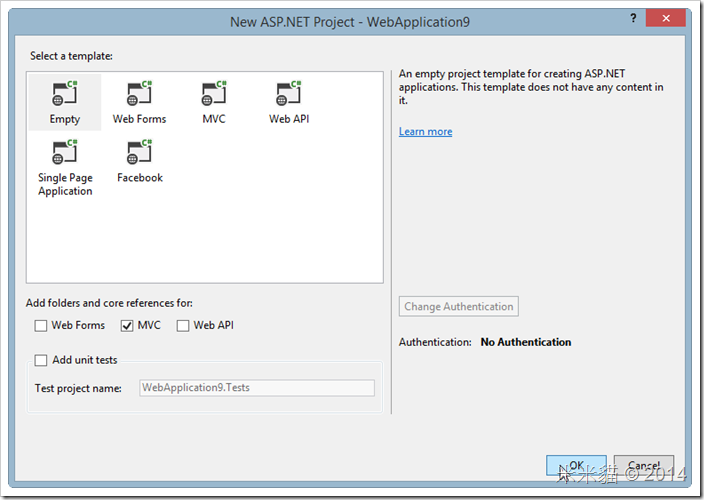
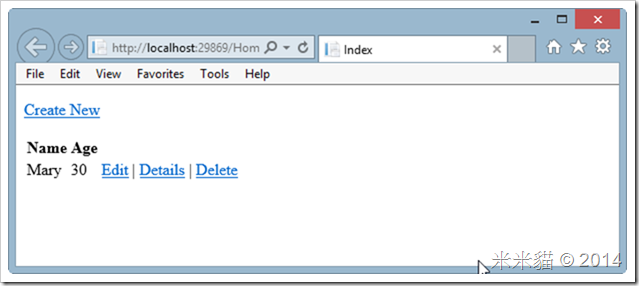
建立一個ASP.NETMVC5專案,利用Code First建立資料表,與預存程序,在Controller中叫用預存程序取得資料顯示在View上。
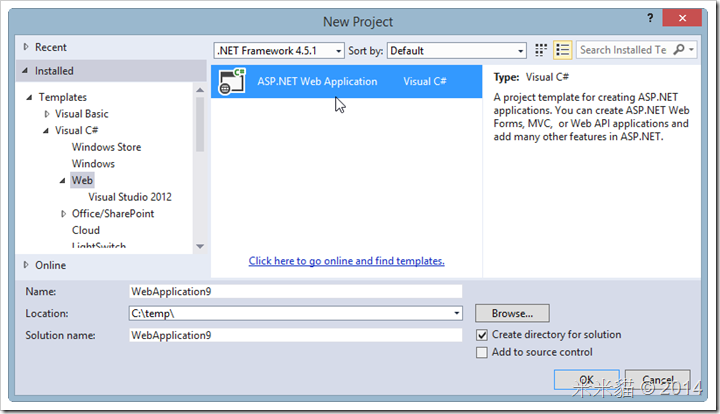
  • New Project

image

image

  • 安裝Entity Framework

image

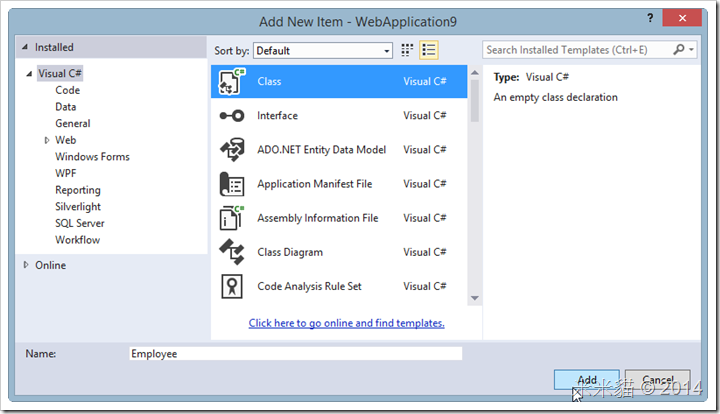
  • Add New Model Class

image

image

  • Add Code:
namespace WebApplication9.Models {
  public class Employee {
    public int ID { get; set; }
    public string Name { get; set; }
    public int Age { get; set; }
  }
}
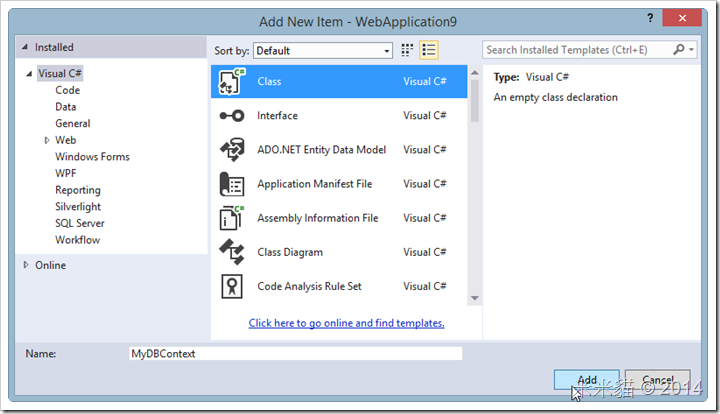
  • Add DbContext Class


image

  • Code

using System;
using System.Collections.Generic;
using System.Data.Entity;
using System.Data.SqlClient;
using System.Linq;
using System.Web;

namespace WebApplication9.Models {
  public class MyDBContext : DbContext {
    public DbSet<Employee> Employees { get; set; }
    public ICollection<Employee> GetEmployeeByID( int id ) {
      return Database.SqlQuery<Employee>( "EXEC dbo.GetEmployeeByID @ID" , new SqlParameter( "ID" , id ) ).ToList( );
    }
  }
}

  • enable-migrations

image

  • 修改Configuration.cs

namespace WebApplication9.Migrations {
  using System;
  using System.Data.Entity;
  using System.Data.Entity.Migrations;
  using System.Linq;
  using WebApplication9.Models;

  internal sealed class Configuration : DbMigrationsConfiguration<WebApplication9.Models.MyDBContext> {
    public Configuration( ) {
      AutomaticMigrationsEnabled = true;
    }

    protected override void Seed( WebApplication9.Models.MyDBContext context ) {
     context.Employees.AddOrUpdate( p => p.Name ,
      new Employee { Name = "Mary" , Age = 30 } ,
      new Employee { Name = "Candy" , Age = 45 } ,
      new Employee { Name = "Jessie" , Age = 34 }
      );
    }
  }
}

  • add-migration SP_GetEmployeeByID

image

  • 工具會產生SP_GetEmployeeB類別

namespace WebApplication9.Migrations
{
    using System;
    using System.Data.Entity.Migrations;
   
    public partial class SP_GetEmployeeByID : DbMigration
    {
        public override void Up()
        {
            CreateTable(
                "dbo.Employees",
                c => new
                    {
                        ID = c.Int(nullable: false, identity: true),
                        Name = c.String(),
                        Age = c.Int(nullable: false),
                    })
                .PrimaryKey(t => t.ID);
           
        }
       
        public override void Down()
        {
            DropTable("dbo.Employees");
        }
    }
}

  • 修改SP_GetEmployeeByID ,加入建立SP的程式

namespace WebApplication9.Migrations
{
    using System;
    using System.Data.Entity.Migrations;
   
    public partial class SP_GetEmployeeByID : DbMigration
    {
        public override void Up()
        {
            CreateTable(
                "dbo.Employees",
                c => new
                    {
                        ID = c.Int(nullable: false, identity: true),
                        Name = c.String(),
                        Age = c.Int(nullable: false),
                    })
                .PrimaryKey(t => t.ID);

          CreateStoredProcedure(
           "dbo.GetEmployeeByID" ,
           p => new {
             ID = p.Int( )
           } ,
           body:
               @"SELECT * from Employees where ID=@ID"
       );
        }
       
        public override void Down()
        {
            DropTable("dbo.Employees");
        }
    }
}

  • update-database

image

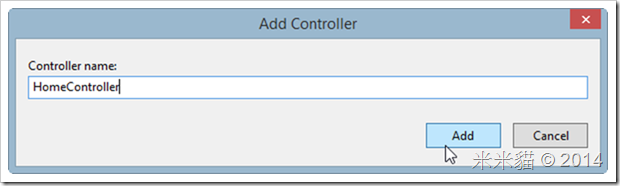
  • Add Controller

image

  • HomeController

image

  • Code,呼叫SP

using System;
using System.Collections.Generic;
using System.Linq;
using System.Web;
using System.Web.Mvc;
using WebApplication9.Models;

namespace WebApplication9.Controllers {
  public class HomeController : Controller {
    //
    // GET: /Home/
    private MyDBContext db = new MyDBContext( );
    public ActionResult Index( ) {
      return View( db.GetEmployeeByID( 1 ).ToList( ) );
    }
  }
}

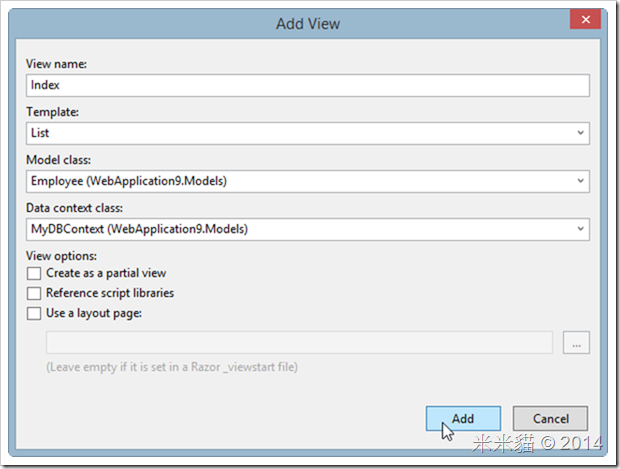
  • Add View
image

image

  • F5執行

image

  • 檢視DB

image

2014年2月27日 星期四

EntityDataSource resurrected?


Tool:Visual Studio 2013 Ultimate
OS:Windows 8.1
.NET Framework : 4.5.1

在 http://vmiv.blogspot.tw/2013/12/rip-entitydatasource.html
這篇文章中,談到EF6不支援 EntityDataSource的問題,有一新解法:
使用xml工具開啟Edmx:
image
image
修改 ProviderManifestToken的值為"2008",然後存檔
image
工具就復活了!!
image

2014年2月25日 星期二

OWIN Host

Tool:Visual Studio 2013 Ultimate
OS:Windows 8.1
.NET Framework : 4.5

The Open Web Interface for .NET (OWIN),定義 Web 伺服器與Framework元件之間的抽象層,更容易開發、使用新元件;應用程式容易移轉到不同裝載程式,或移轉到不同平台或作業系統。

以下步驟說明如何將OWIN Host在IIS

image

image

image

image

  • code:


using System;
using System.Threading.Tasks;
using Microsoft.Owin;
using Owin;

[assembly: OwinStartup( typeof( OWINDemo.Startup ) )]

namespace OWINDemo {
  public class Startup {
    public void Configuration( IAppBuilder app ) {
      app.Run( context => {
        context.Response.ContentType = "text/plain";
        return context.Response.WriteAsync( "Hello from OWIN !" );
      } );

    }
  }
}


  • 按F5,便會啟動browser:

image

  • 換OWIN Host,改用現成的 OWINHost.exe,先用Nuget下載 OwinHost

image

下載下來之後,會有一個OwinHost.exe存在\packages\OwinHost.2.1.0\tools\資料夾

  • 改用OwinHost.exe來裝載

image

  • 設定想用的port與參數

image

  • F5

image


2014年2月24日 星期一

在ASP.NET Web Site啟用Friendly Url


Tool:Visual Studio 2013 Ultimate
OS:Windows 8.1
.NET Framework : 4.5.1

在ASP.NET Web Site啟用Friendly Url步驟

  • New Web Site

image

  • 加入一個Web Form,default.aspx

image

  • 加一個連結,href指向"Manage"

image

  • 加一個Manage.aspx

image

  • 設定h1

image

  • Manage NuGet Package,下載 Microsoft.AspNet.FriendlyUrls.Core

image

  • 加入一個Global.asax


image

  • 加code:


<%@ Application Language="C#" %>
<%@ Import Namespace="Microsoft.AspNet.FriendlyUrls" %>

<script runat="server">

    void Application_Start(object sender, EventArgs e)
    {
        // Code that runs on application startup
        var routes = System.Web.Routing.RouteTable.Routes;
        var settings = new Microsoft.AspNet.FriendlyUrls.FriendlyUrlSettings( );
        settings.AutoRedirectMode = Microsoft.AspNet.FriendlyUrls.RedirectMode.Permanent;
        routes.EnableFriendlyUrls( settings );
    }

image

  • Test,
image
  • URL部份換掉了,選Manage

image

  • URL換掉了

image

總網頁瀏覽量