2014年7月1日 星期二

Entity Framework Power Tools


Tool:Visual Studio 2013 Ultimate Update 2 + Entity Framework Power Tools
OS:Windows 8.1
.NET Framework : 4.5.x

使用Entity Framework Code First方式設計資料存取程式時,因為Model在記憶體,不需EDMX檔案,所以看不到Model的長像

你可以安裝Entity Framework Power Tools,在VS2013 –> Tools –> Extensions and Updates,下載:


image

接著在VS之中,就可以選

image

接著便可以看到:

image

可以看Model

image

DDL SQL:

image

2014年6月24日 星期二

Code First from Database


Tool:Visual Studio 2013 Ultimate Update 2
OS:Windows 8.1
IIS : IIS 8
.NET Framework : 4.5.5

若沒裝Visual Studio 2013 Ultimate Update 2需下載:

從現有資料庫,產生Code First 類別

  • Step – by –Step

image


image

image


image


imageimage

image

image

image

將自動產生


image

image

image

image

image

自動產生

image

image

RUN

image

2014年6月12日 星期四

將HTML交由ASP.NET處理


Tool:Visual Studio 2013 Ultimate
OS:Windows 8.1
IIS : IIS 8
.NET Framework : 4.5.1
Other:ASP.NET Web Forms

若在ASP.NET Web Forms Global.asax註冊Application_BeginRequest事件

<%@ Application Language="C#" %>

<script runat="server">

    void Application_Start(object sender, EventArgs e)
    {
        // Code that runs on application startup

    }
   
    void Application_End(object sender, EventArgs e)
    {
        //  Code that runs on application shutdown

    }
       
    void Application_Error(object sender, EventArgs e)
    {
        // Code that runs when an unhandled error occurs

    }

    void Session_Start(object sender, EventArgs e)
    {
        // Code that runs when a new session is started

    }

    void Session_End(object sender, EventArgs e)
    {
        // Code that runs when a session ends.
        // Note: The Session_End event is raised only when the sessionstate mode
        // is set to InProc in the Web.config file. If session mode is set to StateServer
        // or SQLServer, the event is not raised.

    }

    protected void Application_BeginRequest( object sender , EventArgs e ) {
        Response.Write( "Application_BeginRequest" );
    }
</script>

若有一空白的ASPX網頁如下:

<%@ Page Language="C#" %>

<!DOCTYPE html>

<script runat="server">

</script>

<html xmlns="http://www.w3.org/1999/xhtml">
<head runat="server">
    <title></title>
</head>
<body>
    <form id="form1" runat="server">
    <div>
   
    </div>
    </form>
</body>
</html>

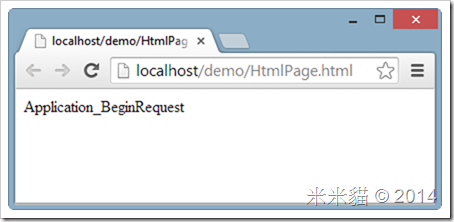
則執行ASPX時,便會自動印出以下字串,在ASPX執行之前,會先執行Application_BeginRequest事件

image

但相同網站內的HTML檔案則不會有此效果,只要設定HTML由ASP.NET處理就可,我們可以在組態檔加入以下設定

<configuration>

  <system.web>
    <compilation debug="true" targetFramework="4.5.1">
      <buildProviders >
        <add extension=".html" type="System.Web.Compilation.PageBuildProvider"   />
      </buildProviders>
    </compilation>
    <httpRuntime targetFramework="4.5.1" />
  </system.web>

  <system.webServer>
    <handlers>
      <add name="test" path="*.html" verb="*" type="System.Web.UI.PageHandlerFactory" resourceType="File" preCondition="integratedMode" />
    </handlers>
  </system.webServer>

</configuration>

若有空白HTML如下

<!DOCTYPE html>
<html xmlns="http://www.w3.org/1999/xhtml">
<head>
    <title></title>
</head>
<body>

</body>
</html>

也會跟ASPX一樣有相同效果

image

2014年6月6日 星期五

ASP.NET下一版懶人包


ASP.NET vNext and Visual Studio "14"

  • ASP.NET MVC 6 framework將MVC、Web API、Web Pages整合成一個framework
  • 你需要使用 Visual Studio "14" 來建立與編譯 MVC 6 專案
  • MVC 6 專案可以在命令提示字元編譯並執行(不需VisualStudio)
  • 專案檔案(原*.csproj)改用JSON格式存放 - project.json
  • 新增startup class,在Configure方法設定HTTP request pipeline ,或設定MVC 6路由
  • ASP.NET Web API Controller改繼承自Controller (前一版繼承自ApiController)類別
  • route template 新增{area} parameter,以定義Areas(前一版叫用AreaRegistration.RegisterAllAreas方法)
  • Web API 將支援Area (前一版不支援,新版MVC與Web API整合成一個Framework,可以共用路由、filter、model binding...等等功能)
  • 新增ViewComponent,讓View可以使用Html.Component呼叫Action,並顯示結果
  • 新增POCO Controllers,不需繼承自 Microsoft.AspNet.Mvc.Controller


參考資源

2014年5月5日 星期一

must derive from WebViewPage, or WebViewPage


Tool:Visual Studio 2013 Ultimate
OS:Windows 8.1
.NET Framework : 4.5.1
MVC版本:ASP.NET MVC 5


在開發MVC 5專案時,專案突然出現這個錯誤訊息:

The view at '~/Views/Opera/Index.cshtml' must derive from WebViewPage, or WebViewPage<TModel>.

image


孤狗了網路上的一些解法,但都不能解決問題。

花了兩個小時,邊亂試邊放空的情況下,突然想到MVC組件是不是有問題。從Solution Explorer發現專案指定的MVC與Razor組件的資料夾並不存在:

image

image

因為米米貓為了節省空間,將組件集中放到別的資料夾了,ORZ…

解法方案,先移除組件參考

image

重新加入參考

image

選到正確路徑下的組件檔案

image

這樣就解決了!!

總網頁瀏覽量