是不是所的貓都約好了, 休息時一定要睡在NB上呢?
這天肥咪CEO正在NB上小憩, 喵喵戶長就是手賤一直來挑釁....
2008年12月15日 星期一


2008年12月14日 星期日
部署 ASP.NET 應用程式至IIS 7 注意事項
2008年12月9日 星期二
Step-By-Step教學(18):發行你的資料庫資料
Visual Studio 2008有一個新功能,可以發行你的資料庫結構描述資訊以及資料,參考以下步驟
1.開啟 Server Explorer,選取要發行的DB,選 Publish to provider
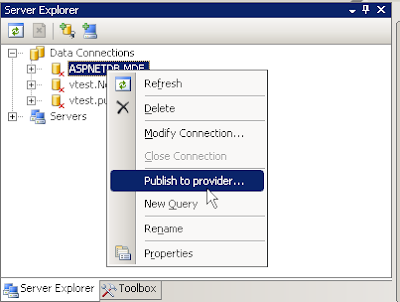
2.Database Publishing Wizard會自動出現

3.選取要發行的DB

4.選擇產生sql 檔案

5.選擇目地資料庫,如 SQL Server 2008

6.按Next
 7.開始發行

8.發行完畢!
 9.開啟目地的資料庫伺服器上的SQL Server Management Studio,選擇目地資料庫,建立一個新查詢,然後執行上一個步驟產生的sql檔案

1.開啟 Server Explorer,選取要發行的DB,選 Publish to provider

2.Database Publishing Wizard會自動出現

3.選取要發行的DB

4.選擇產生sql 檔案

5.選擇目地資料庫,如 SQL Server 2008

6.按Next
 7.開始發行
8.發行完畢!
 9.開啟目地的資料庫伺服器上的SQL Server Management Studio,選擇目地資料庫,建立一個新查詢,然後執行上一個步驟產生的sql檔案
2008年12月5日 星期五
Step-By-Step教學(17):Entity Framework 與 資料繫結
Entity Framework也支援資料繫結功能,讓物件服務查詢回來的資料能夠呈現在表單程式(Form)控制項上。本教學說明如何設定資料繫結,在進行之前,需先完成Step-By-Step教學(16):使用Object Service查詢 Entity Framework的1~5步驟
1.在Visual Studio選取「Data」->「Add New Data Source」,建立一個資料來源,接著會出現精靈,選取以「Object」作為資料來源
 2.接下來選擇要繫結的Entity,如employee

3.接下來完成精靈後,可以在Data Source視窗看到employee類別,您可以從Data Source視窗拖曳想要繫結的屬性到表單畫面中,表單上會自動產生employeeBindingSource與employeeBindingNavigator兩個元件。
 4.最後在Form_Load程式中,透過ObjectQuery的Execute方法查詢出資料,再將查詢結果指定給BindingSource元件即可:
5.執行結果

1.在Visual Studio選取「Data」->「Add New Data Source」,建立一個資料來源,接著會出現精靈,選取以「Object」作為資料來源
 2.接下來選擇要繫結的Entity,如employee
3.接下來完成精靈後,可以在Data Source視窗看到employee類別,您可以從Data Source視窗拖曳想要繫結的屬性到表單畫面中,表單上會自動產生employeeBindingSource與employeeBindingNavigator兩個元件。
 4.最後在Form_Load程式中,透過ObjectQuery的Execute方法查詢出資料,再將查詢結果指定給BindingSource元件即可:
1 using System;
2 using System.Collections.Generic;
3 using System.ComponentModel;
4 using System.Data;
5 using System.Drawing;
6 using System.Linq;
7 using System.Text;
8 using System.Windows.Forms;
9 using System.Data.Objects;
10 namespace EFTest
11 {
12 public partial class Form2 : Form
13 {
14 public Form2()
15 {
16 InitializeComponent();
17 }
18 private void Form2_Load(object sender, EventArgs e)
19 {
20 var ctx = new pubsEntities();
21 ObjectQuery<employee> regions = ctx.employee;
22 employeeBindingSource.DataSource = regions.Execute(MergeOption.AppendOnly);
23 }
24 }
25 }
5.執行結果

2008年12月4日 星期四
Step-By-Step教學(16):使用Object Service查詢 Entity Framework
本教學介紹如何在表單程式中,使用Object Service查詢 Entity Framework中的物件
1.建立一個Windows Forms應用程式
2.加入ADO.NET Entity Data Model
 3.選DataBase
 4.選Pubs資料庫
 5.勾選想要的資料表
 6.在Forms加兩個Button,一個ListBox
7.匯入namespace,分別在兩個Button的Click事件加入程式碼,第一個button利用ObjectQuery查詢employee資料表;第二個button則傳入參數做篩選,程式碼看起來如:
8.第一個Button執行結果:
 9.第2個Button執行結果:

1.建立一個Windows Forms應用程式
2.加入ADO.NET Entity Data Model
 3.選DataBase
 4.選Pubs資料庫
 5.勾選想要的資料表
 6.在Forms加兩個Button,一個ListBox
7.匯入namespace,分別在兩個Button的Click事件加入程式碼,第一個button利用ObjectQuery查詢employee資料表;第二個button則傳入參數做篩選,程式碼看起來如:
1 using System;
2 using System.Collections.Generic;
3 using System.ComponentModel;
4 using System.Data;
5 using System.Drawing;
6 using System.Linq;
7 using System.Text;
8 using System.Windows.Forms;
9
10 using System.Data.Objects;
11 namespace EFTest
12 {
13 public partial class Form1 : Form
14 {
15 private void button1_Click(object sender, EventArgs e)
16 {
17 var ctx = new pubsEntities();
18 ObjectQuery<employee> empList = ctx.employee;
19 foreach (var emp in empList)
20 {
21 listBox1.Items.Add(emp.emp_id.ToString() + "\t" + emp.fname);
22 }
23 }
24
25 private void button2_Click(object sender, EventArgs e)
26 {
27 var ctx = new pubsEntities();
28 ObjectQuery<employee> empList = ctx.employee.Where("it.fname like @name", new ObjectParameter("name","a%"));
29 foreach (var emp in empList)
30 {
31 listBox1.Items.Add(emp.emp_id.ToString() + "\t" + emp.fname);
32 }
33 }
34
35 public Form1()
36 {
37 InitializeComponent();
38 }
39 }
40 }
8.第一個Button執行結果:
 9.第2個Button執行結果:
訂閱:
文章 (Atom)